If you are unable to access the internet or don’t use a desktop computer or laptop, you will not be able to take advantage of remote online notary services. In this case, you can request that our notary come to or meet you in person. If others need to sign your documents, such as witnesses or other parties required to sign the documents, they will need to be with you in person or online at the same time, because the notary is required by law to observe everyone sign the documents during the notarization process. In other words, don’t have someone sign ahead of time, because everyone must be in the presence of the notary and first provide valid identification.
For more details please read through the Notary FAQ later on this page. But first, take a moment to look through the the sample scenario where signers in four separate states connect with a Florida Remote Online Notary.
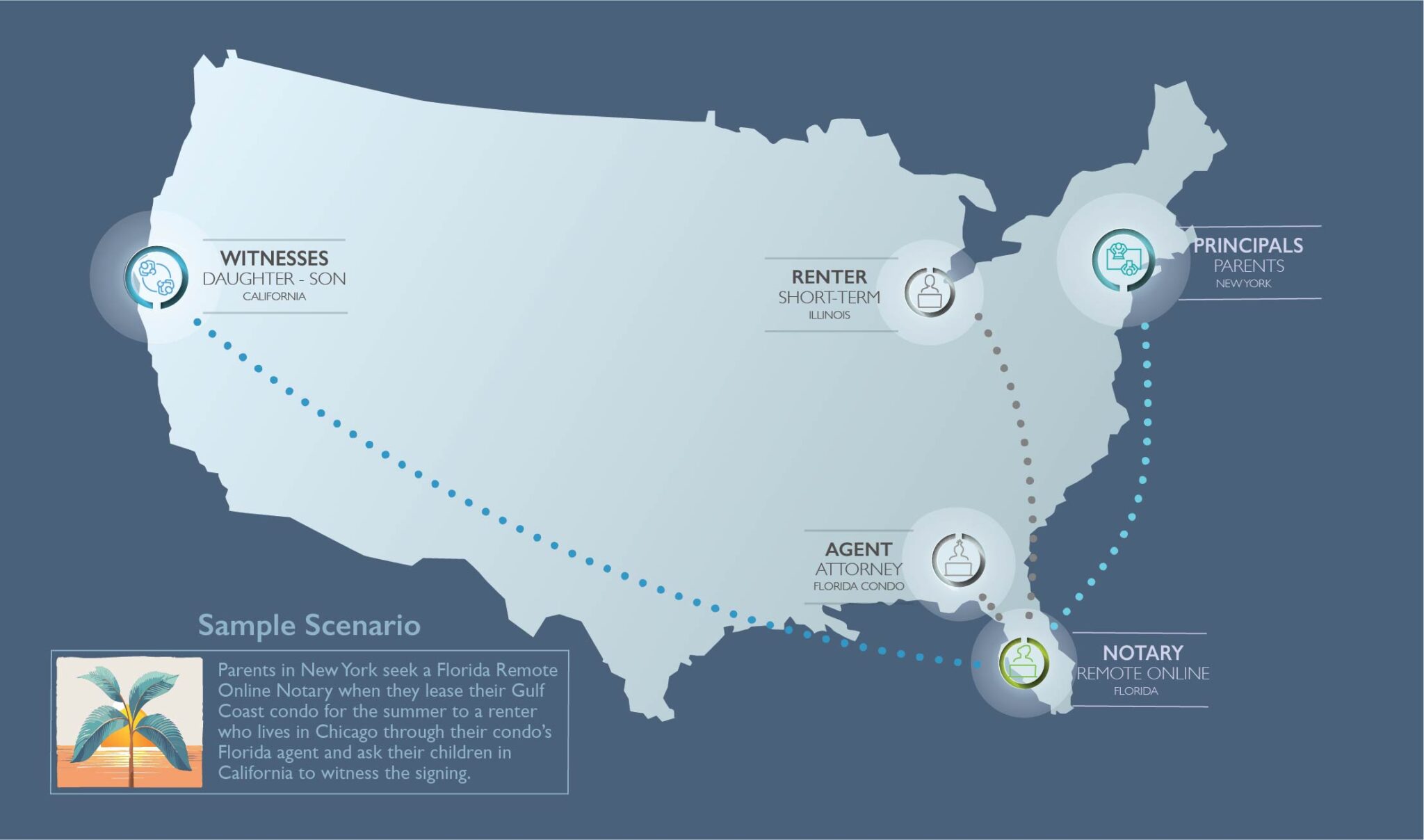
A major advantage of using a remote online notary is when the signers to your document live in different U.S. locations. For example, if you and your witnesses live in one state, but other signers live in different states, you can still notarize a document without having to travel and meet up in the same location. Online notarization works like joining a Zoom call. You arrange all your signers to click on a link at an agreed upon time.
That depends. If only you are signing a single straightforward document that requires no witness signatures and you already know how to take a front and back photo of your driver’s license and how to upload it to a web browser (Safari or Chrome recommended), it takes a matter of minutes for our notary to then add her notary stamp. You will also have to upload an unsigned copy of the document you need notarized (max size 35 MB), so it may be easier to use a computer with a larger screen and enough memory (minimum RAM 4 GB).
When you notarize online, you will need to click on a link and upload a copy of your photo ID to get verified. Second, you will need to upload the document(s) you are notarizing in PDF format. Prior to the online notarization, you will also have to submit your credit card payment details. A main advantage is that your notary session can be scheduled quickly.
If you select to have your document(s) notarized in person on paper, you avoid the online fees and can pay by cash, check or credit card. However, your notary session will need to be scheduled and could take longer, but not always.
If you’re familiar with sharing documents during a Zoom meeting, then you should be able to estimate how long it takes people to communicate using share screens. You and your signers will sign documents online. Then our notary will attach their notary stamp (sometimes called notary seal) to complete the notarization.
Accepted IDs include driver’s license, state or military issued ID or passport. You will also need to provide a valid US address and have a valid SSN for two years.
In a traditional notarization with your paper documents, there are no fees added to use a remote online service provider. You won’t need to make electronic copies and your documents can be notarized in person. The notarization fee for a single document with a single signer is $10.
The cost of a remote online notarization—that is, getting a notary stamp attached to your first document—is set by the State of Florida at $25. There is an additional cost per signer. Remind your signers that they too will have to follow a link to the online session and verify their identity. Just as you, they will have to upload a copy of their photo ID and get verified before you and your signers will be connected to our notary. There is also an additional cost per notary seal for each additional document that you need notarized.
Digital documents you upload for notarization cannot be larger than 35 MB and need to be in PDF format to get signatures and notary stamps. Other files that do not need to receive signatures can be docx, pptx or xlsx text formats. Images, like photos of an ID, can be png, svg, bmp, jpg or tiff format. Be aware if your phone has limited memory (RAM) you may encounter difficulty. Best advice, suggest signers to your documents use Chrome or Safari web browsers on their computer, as tablets and phones sometimes have lower memory and may not work as well.
You can call, text or email us for further detail and pricing and to schedule your notarization in person or online.
Would you like to speak to one of our online remote notaries or paralegals?

When time is of the essence and you need a notary or paralegal, we’re here to fill the gap or stay forever.
© 2025 Picture the Worlds, www.picturetheworlds.com. All rights reserved – Developed by App Innovation Technologies